Claude Code Security Plugin: What It Catches and Misses
Anthropic's new Claude Code security plugin catches common vulnerabilities as code is written
By Abhay Mittal
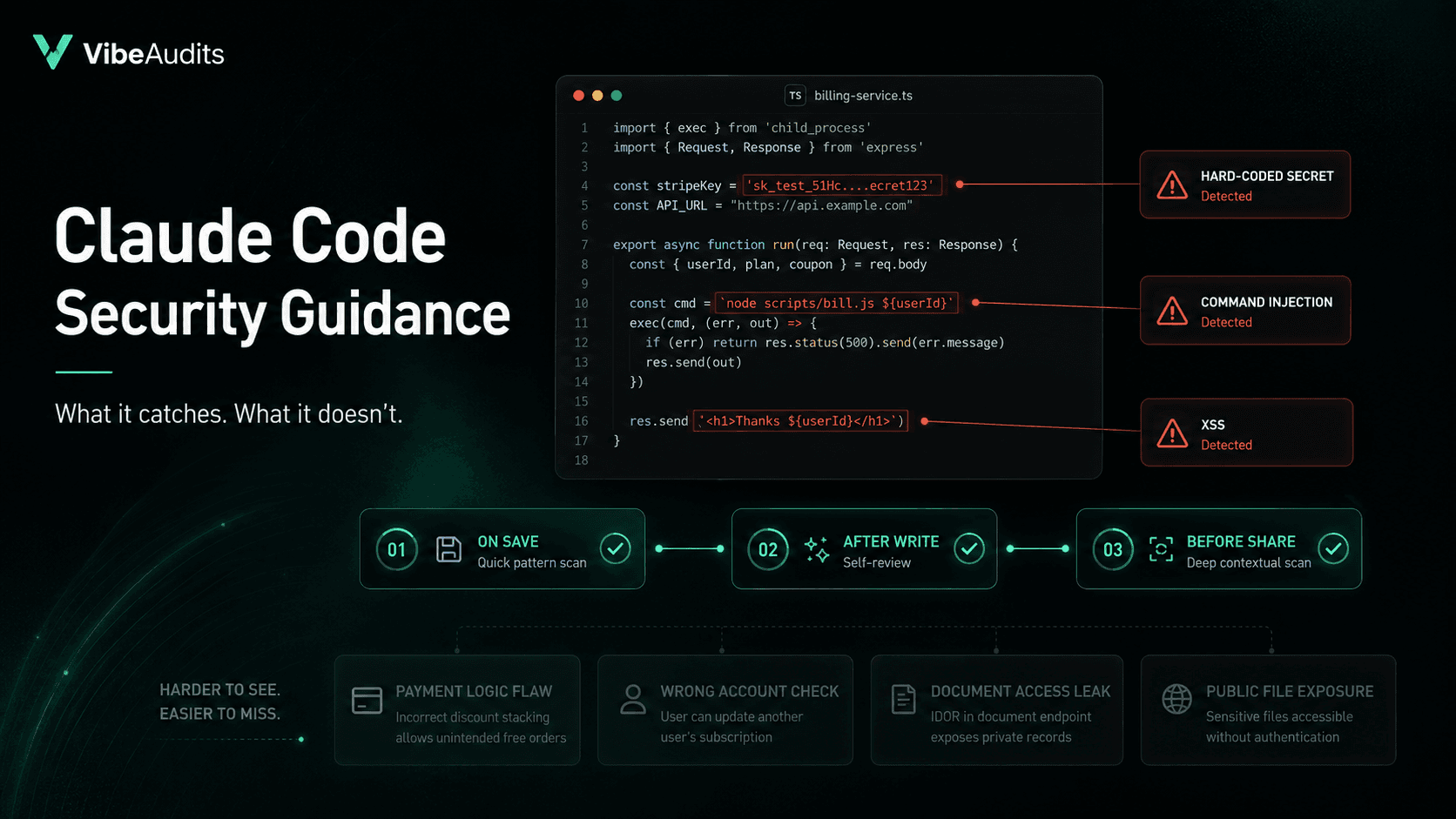
Anthropic released a free plugin for Claude Code that checks code for security problems as it's being written. Every Claude Code user can install it with a single command.
If your team ships software with AI helping write it, this changes what "safe by default" looks like. It also raises a bigger question than the plugin itself: what does this actually catch, and what still needs human attention?
How the plugin works
The plugin runs three checks at different moments while you're coding.
The first happens every time a file gets saved. It's a quick text scan with no AI involved, looking for known dangerous patterns. Things like running raw system commands, executing user input as code, or stuffing untrusted text into a webpage. No AI runs at this stage, so the check is instant and costs nothing.
The second runs right after Claude finishes writing or editing. Claude reads back its own work, asks whether anything looks risky, and fixes problems before moving on.
The third kicks in when Claude is about to save the code to a shared project, the point where it would leave your machine. This one is the most thorough. It reads the changed code along with the surrounding files, so it understands the context and raises fewer false alarms.
Anthropic's own testing showed a 30 to 40 percent drop in security comments during code review, which means fewer mistakes reach the people doing the reviewing.
What it catches
The plugin is good at well-known mistakes. Passwords sitting in plain text inside the code. Sloppy handling of user input that lets an attacker run their own commands on your server. Classic ways of accidentally letting strangers inject malicious scripts into a website.
These are errors taught in every introductory security course that still slip through at 11pm on a Friday.
For teams using AI to write code, the plugin matters because AI models reach for these shortcuts often. They're convenient, they look like clean English, and a model writing 200 lines in one pass will sometimes use them without thinking. The plugin acts as a tireless second pair of eyes.
What it doesn't catch
The plugin works by recognizing patterns in code. It cannot understand what your business does.
It won't catch a payment page that lets one customer pay using another customer's saved card. It won't flag a permission check running against the wrong account. It won't notice that your AI search tool is returning documents the person asking shouldn't be allowed to see. It won't recognize that your file upload accepts only images, but stores them where anyone on the internet can download them.
These are the failures that actually take down AI-built applications in the real world. Each line looks fine on its own. The bug lives in the gap between two pieces that each pass their own little test.
How teams should think about it
Install the plugin. It's free, takes one command, and the safety floor it raises is real. You can also give it project-specific rules through a small config file, worth doing for anything unique to how your product works.
Then assume your harder problems haven't moved. The security flaws that lose customers, leak private data, or end up in a public disclosure are the ones that require someone to think about your specific business, your specific data, and the specific ways your users behave. That work doesn't get automated by a code scanner, however clever.
The plugin is a clean win for the simple stuff. What ships past it still needs people who understand what your product is actually for.
Keep reviewing your app
Practical checks for the parts of an AI-built app that handle real users and money.
Vibe-coded app security checklist
Work through 25 checks before accepting real users, payments, and private data.
How to review vibe-coded apps
Plan a review, test the risky flows, and decide when you need a professional audit.
Free vibe code security check
Answer 15 questions to score your app's launch risk and see what to fix first.
Need a second pair of eyes? Explore our code audit services, scope and pricing, and client case studies.