The 5 Security Flaws That Show Up in Almost Every Vibe-Coded App
Most apps built with Cursor, Claude, Bolt, Replit or Lovable ship with the same critical security gaps. Here are the five we see most often, why they happen, and exactly how to fix them before you take real users or payments.
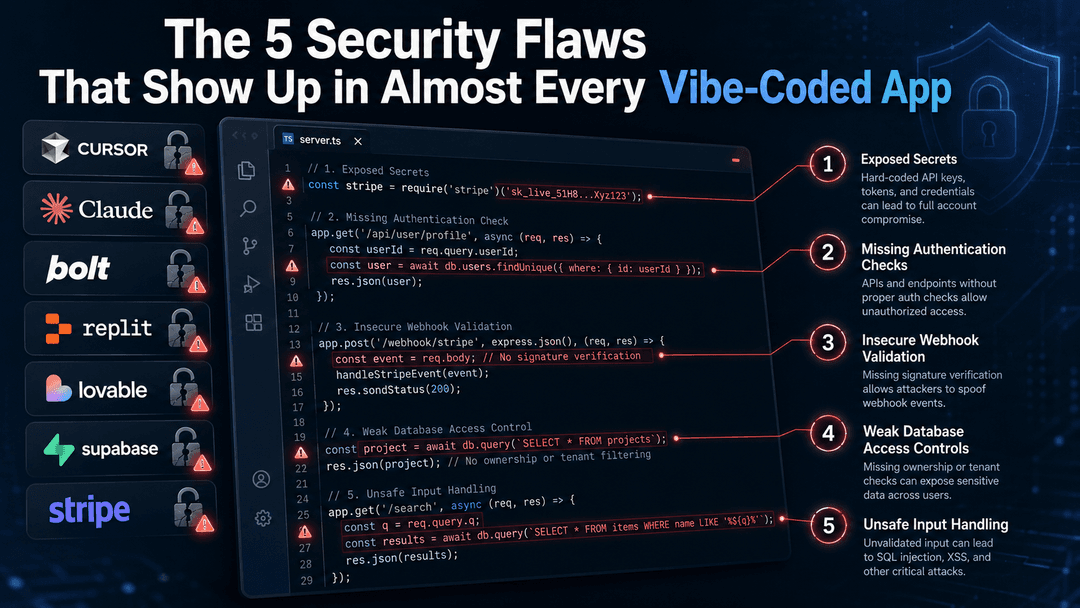
You built something fast. The demo works. Friends are impressed. You’re thinking about launching or even charging money.
Then someone asks the uncomfortable question: “Is this actually secure?”
We’ve audited a lot of these apps over the past year. The pattern is almost boring at this point. Different tools, different founders, different ideas, but the same five problems keep showing up.
Here’s what we find most often, ranked by how often they appear and how bad the damage can get.
1. Missing or broken Row Level Security on Supabase
This is still the number one critical issue.
AI tools love generating Supabase tables. They create the schema, they set up the client, and they often forget (or poorly write) the Row Level Security policies. Without proper RLS, anyone who has your public anon key can read or write every row in the table.
We’ve seen user emails, payment records, and private messages sitting wide open because of this single mistake.
How to check it yourself Go into the Supabase dashboard, open every table, and look at the RLS settings. If RLS is off, or if the policies are too loose (like USING (true)), you have a problem.
How to fix it Turn RLS on for every table. Write tight policies that check auth.uid() = user_id (or whatever ownership column you use). Test them by trying to access another user’s data while logged in as a different user.
2. API keys sitting in the frontend
This one is almost as common and just as dangerous.
When you ask Cursor or Claude to “add OpenAI” or “connect Stripe,” the fastest path for the model is to drop the secret key right into a React component or a client-side config file. That key then gets shipped to every visitor’s browser.
We’ve seen OpenAI keys, Anthropic keys, Stripe secret keys, and even Supabase service role keys sitting in production JavaScript bundles.
How to check it yourself Open your deployed site, open DevTools, and search the sources or network responses for strings that look like keys (sk-, sk_live, service_role, etc.). You can also search your entire repo for the same patterns.
How to fix it Move every secret to the server. Use environment variables that never reach the browser. For OpenAI or Anthropic calls, create a simple API route that holds the key and proxies the request. Rotate any key that ever lived in client-side code.
3. Broken object-level authorization (IDOR)
The app checks that you’re logged in. It does not check that you’re allowed to see this particular resource.
You change an ID in the URL or in an API call and suddenly you’re looking at another user’s data, invoices, or private notes. This shows up constantly in vibe-coded CRUD endpoints.
How to check it yourself Log in as User A, note the IDs of your resources, then log in as User B and try those same IDs. If you can still see or edit the data, you have an authorization bug.
How to fix it On every endpoint that touches a resource, verify ownership before returning or modifying anything. Don’t trust the ID that comes from the client. Always check it against the authenticated user.
4. No rate limiting on expensive endpoints
AI coding tools focus on making features work. They rarely add rate limits.
The result is endpoints (especially ones that call OpenAI, Anthropic, or other paid APIs) that can be hammered without restriction. An attacker, or even a curious user with a script, can burn through your entire monthly AI budget in a few hours.
How to check it yourself Look at any route that triggers an LLM call or any heavy database operation. Is there a rate limiter? Is there any cost control?
How to fix it Add rate limiting (by IP and by user). Set hard daily or monthly spend caps with your AI providers. Consider requiring a paid plan or credits before allowing high-volume AI features.
5. Stripe webhooks without signature verification
This one is quieter but still common.
The AI scaffolds a webhook endpoint for Stripe. It listens for payment_intent.succeeded or checkout.session.completed. What it often skips is verifying the Stripe signature. Without that check, anyone can POST fake events to your endpoint and grant themselves paid access or trigger other privileged actions.
How to check it yourself Open the webhook handler and look for the signature verification step using Stripe’s library. If it’s missing, the endpoint is insecure.
How to fix it Use the official Stripe library to verify the signature on every incoming webhook. Reject anything that fails verification. Test it by sending a request with a bad signature and confirming it gets rejected.
These five issues account for the majority of the serious findings we see. Most of them are not exotic zero-days. They are basic, well-understood problems that AI tools still produce regularly because the models optimize for “it works” rather than “it is safe.”
You can fix many of these yourself with the checks above. If your app is already taking real users, processing payments, or handling any kind of personal data, a focused human review is still worth doing. Automated scanners catch some of these problems. They miss others, especially the ones that depend on business logic and ownership rules.
If you want a second pair of eyes on your vibe-coded app before you go live or start charging, you know where to find us.